Mac Notes — Parallels Input Switching, homebrew, Archive Utility
Contents
Things that blocked me on a Mac, collected on one page. Some are from 2015 and some from 2023, so the eras are mixed.
Command+Space for input switching inside Parallels
Pressing Command+Space inside Parallels gets swallowed by Spotlight on the host, so it never reaches the Windows guest. On Korean keyboards this is the input-switching key, so it matters. This setup has worked from Parallels 8 through 11.
1. Swap the shortcuts in Keyboard settings
Swap the shortcuts for “Select the previous input source” and “Select next source in Input menu”.
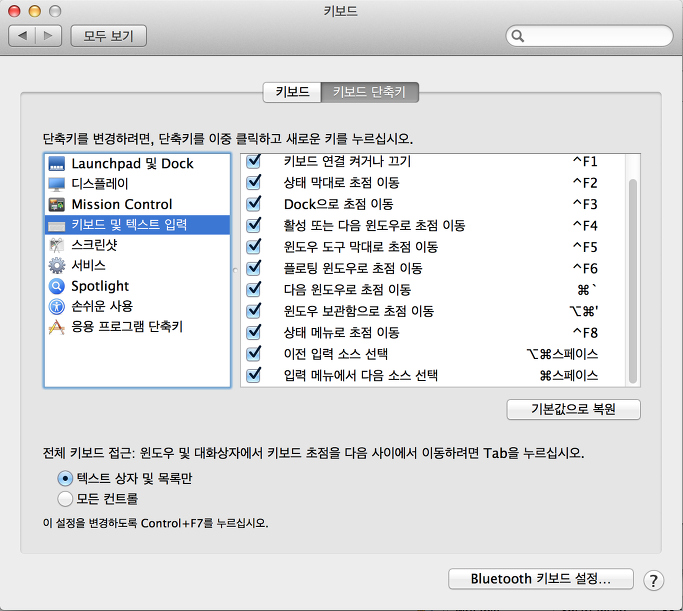
2. Add a mapping in Parallels preferences
Send Command+Space through as AltGr.
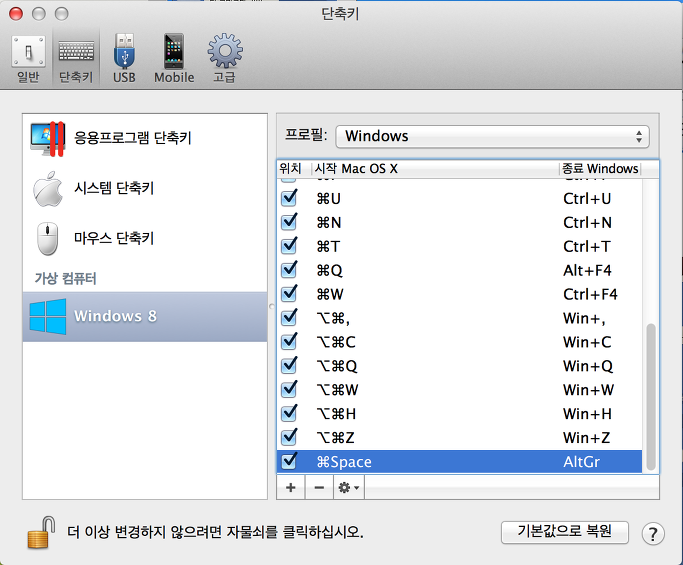
That is all it took.
Installing homebrew
This was on OSX 10.10.3 Yosemite. One line in the terminal.
| |
Checking it.
| |
Archive Utility doing nothing
This happened on an M2 MacBook Air.
Double-clicking a zip did not extract it. No error, nothing at all. After staring at it for a while the cause turned out to be that the filename started with a digit.
| |
Renaming it made double-click work again.
1_test.zip does extract if you right-click, choose the extract menu and pick the
destination folder yourself. Only the double-click path is blocked.
Maybe it is being read as a split archive (like .zip.001). I still do not know the real
reason.
Summary
- For Parallels input switching, swap the macOS keyboard shortcuts and map to AltGr
- homebrew installs with a single script
- If a zip will not open on double-click, suspect a leading digit in the filename